When people talk about NVIDIA’s dominance in AI computing, the conversation usually starts with GPUs.
But the GPU is only part of the story.
A powerful GPU needs software that can actually use its parallel computing capabilities. Developers need programming tools, libraries, compilers, runtime components, and frameworks that can communicate efficiently with the hardware.
This is where NVIDIA CUDA comes in.
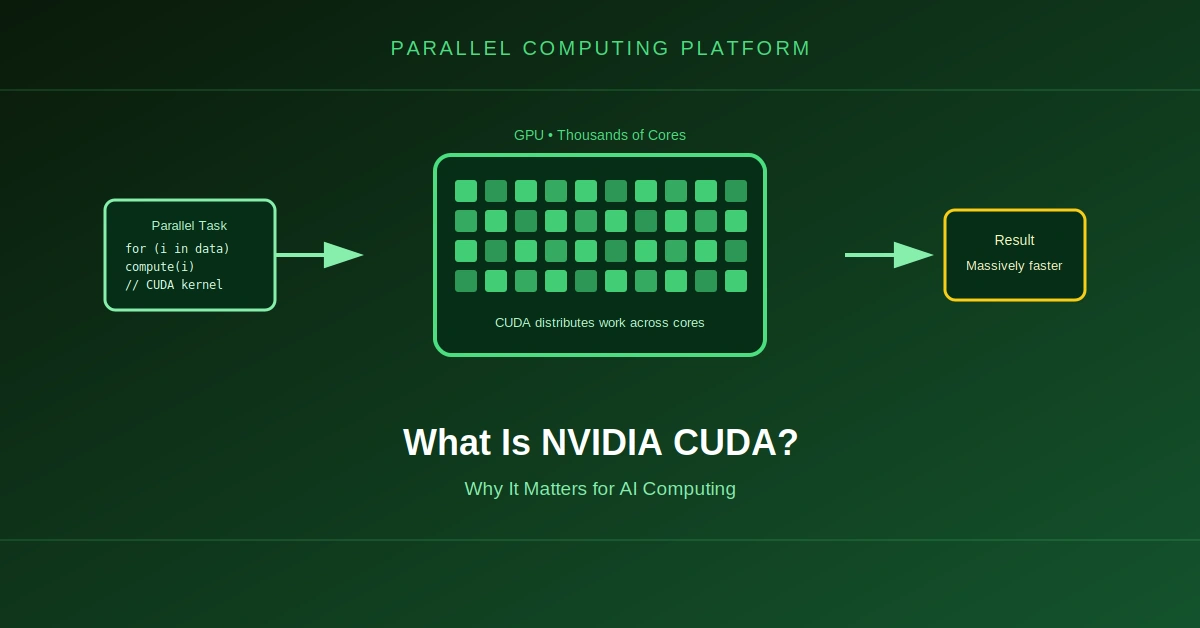
CUDA provides the software platform and programming model that allows applications to use NVIDIA GPUs for general-purpose computing. NVIDIA’s official CUDA Programming Guide describes CUDA as a parallel computing platform and programming model for accelerating compute-intensive applications with GPUs. (docs.nvidia.com)
CUDA has become particularly important for artificial intelligence because modern AI workloads rely heavily on GPU acceleration.
But what exactly is CUDA, and why does it matter so much to AI?
What Is NVIDIA CUDA?
CUDA stands for Compute Unified Device Architecture.
NVIDIA introduced CUDA in 2006 to make its GPUs programmable for general-purpose computing rather than limiting them primarily to graphics workloads. NVIDIA’s current documentation describes this transition as an important step toward using GPUs for scientific computing, analytics, deep learning and other computational workloads. (docs.nvidia.com)
In simple terms:
Traditional GPU use
        ↓
Graphics rendering

CUDA
        ↓
General-purpose GPU computing
        ↓
AI
Scientific computing
HPC
Data processing
Simulation
Analytics
CUDA is often described as a programming platform rather than simply a programming language.
That distinction matters.
CUDA includes a programming model, software libraries, development tools, compiler components, runtime functionality and other technologies that allow software to take advantage of NVIDIA GPUs.
NVIDIA’s CUDA platform documentation describes the platform as a collection of software and hardware technologies for heterogeneous computing systems. (docs.nvidia.com)
CUDA Is Not Just a Programming Language
One of the most common misunderstandings about CUDA is treating it as a standalone programming language.
CUDA supports programming using languages such as C++ and Python, while also providing APIs, libraries, tools and runtime components for GPU computing.
For example, a developer can write CUDA C++ code that launches a function on the GPU.
Python developers can also access GPU acceleration through libraries and frameworks that use CUDA underneath.
A simplified view looks like this:
Application
     ↓
Python / C++ / Framework
     ↓
CUDA
     ↓
NVIDIA GPU
This abstraction is important because most AI developers do not write every GPU operation themselves.
Instead, frameworks and libraries use CUDA capabilities underneath the application.
How CUDA Works With the CPU and GPU
CUDA uses a heterogeneous computing model.
That means the application can use both the CPU and GPU.
The CPU is generally referred to as the host, while the GPU is the device.
A simplified application might work like this:
              CPU
             Host
               |
        Prepare the data
               |
               ↓
        Copy / access data
               |
               ↓
              GPU
            Device
               |
         Run parallel work
               |
               ↓
        Return / process result
               |
               ↓
              CPU
According to NVIDIA’s CUDA programming model, CUDA applications begin execution on the CPU, which can then transfer data, launch GPU work and synchronize with GPU execution. CPU and GPU work can also proceed concurrently. (docs.nvidia.com)
The basic idea is simple:
The CPU controls the application, while the GPU performs suitable parallel computations.
Why Are GPUs Useful for AI?
To understand CUDA’s importance, it helps to understand the type of calculations used by AI models.
Neural networks perform enormous numbers of mathematical operations involving vectors, matrices and tensors.
For example, a simplified operation might look like:
A × B = C
where A and B can contain millions or billions of values.
A CPU can perform these calculations, but GPUs are designed to execute large numbers of similar operations in parallel.
That makes them particularly effective for workloads such as:
- Matrix multiplication
- Tensor operations
- Neural-network training
- Image processing
- Scientific simulations
- Large-scale numerical computation
CUDA provides the software layer that lets developers map suitable computational work onto NVIDIA’s parallel GPU architecture.
What Is a CUDA Kernel?
One of the most important concepts in CUDA is the kernel.
A kernel is a function that is executed on the GPU.
Instead of executing one function once on the CPU, a CUDA application can launch a kernel with a large number of GPU threads.
For example:
__global__ void add(float *a, float *b, float *c)
{
    int i = blockIdx.x * blockDim.x + threadIdx.x;
    c[i] = a[i] + b[i];
}
The important idea is not the syntax itself.
Suppose an array contains one million elements.
A CUDA kernel can assign different elements to different GPU threads:
Element 0  → Thread 0
Element 1  → Thread 1
Element 2  → Thread 2
Element 3  → Thread 3
...
Element N  → Thread N
The GPU can then process many of those operations concurrently.
NVIDIA’s CUDA programming model organizes these threads into thread blocks, which are themselves organized into a grid when a kernel is launched. (docs.nvidia.com)
This programming model allows developers to express large parallel workloads without manually controlling every physical GPU execution unit.
What Are CUDA Threads, Blocks and Grids?
CUDA organizes GPU work into a hierarchy.
Grid
 ├── Block
 │    ├── Thread
 │    ├── Thread
 │    ├── Thread
 │    └── ...
 │
 ├── Block
 │    ├── Thread
 │    ├── Thread
 │    └── ...
 │
 └── Block
      ├── Thread
      └── ...
A thread performs an individual piece of work.
A thread block groups threads that can cooperate using shared memory and synchronization mechanisms.
A grid represents the collection of thread blocks launched for a kernel.
This structure allows CUDA software to express workloads containing thousands or even millions of GPU threads.
What Is SIMT?
CUDA GPUs use a programming model called SIMT, or Single Instruction, Multiple Threads.
The basic idea is that many threads can execute the same kernel instructions across different pieces of data.
CUDA groups threads into units called warps. NVIDIA’s current programming guide describes a warp as a group of 32 threads that generally progress through instructions together. (docs.nvidia.com)
A simplified example:
Warp
 |
 +-- Thread 1  → Data 1
 +-- Thread 2  → Data 2
 +-- Thread 3  → Data 3
 ...
 +-- Thread 32 → Data 32
This is one of the fundamental mechanisms that allows NVIDIA GPUs to execute highly parallel workloads efficiently.
CUDA and GPU Memory
Computing is only one part of GPU performance.
Data also has to move efficiently between memory and the GPU’s execution units.
CUDA exposes different types of GPU-accessible memory, including:
- Registers
- Shared memory
- Local memory
- Global memory
- Constant memory
- Texture memory
Different memory types have different characteristics.
For example, registers are extremely close to the execution units and are used for thread-local values, while global memory provides much larger storage capacity but generally has higher access latency.
This matters enormously for AI.
A neural-network operation may perform billions of calculations, but if data cannot reach the GPU’s computing resources efficiently, the GPU may spend time waiting for memory.
Good CUDA programming therefore involves more than simply sending work to the GPU.
It also involves understanding how data moves through the GPU memory hierarchy.
What Is the CUDA Toolkit?
Developers do not normally build CUDA applications from a single library.
NVIDIA provides the CUDA Toolkit, which contains the development components required to build and optimize GPU-accelerated software.
The toolkit includes components such as:
- CUDA libraries
- Compiler tools
- Runtime libraries
- Debugging tools
- Performance analysis tools
- Development utilities
- Documentation and samples
NVIDIA describes the CUDA Toolkit as a development environment for creating, optimizing and deploying GPU-accelerated applications across workstations, data centers, cloud platforms and supercomputers. (docs.nvidia.com)
A simplified development stack looks like:
Developer Code
      ↓
CUDA C++ / Python
      ↓
CUDA Toolkit
      ↓
CUDA Runtime + Libraries
      ↓
NVIDIA Driver
      ↓
NVIDIA GPU
This software stack is a major reason CUDA is much more than an API for launching GPU functions.
CUDA Libraries Are Extremely Important
Developers do not need to implement every mathematical operation manually.
NVIDIA provides optimized libraries for many common workloads.
Examples include:
- cuBLAS for linear algebra
- cuDNN for deep learning primitives
- cuFFT for Fast Fourier Transform operations
- CUTLASS for high-performance matrix multiplication and related operations
- NCCL for communication between GPUs
NVIDIA’s CUDA documentation specifically points developers toward optimized libraries such as cuBLAS, cuFFT, cuDNN and CUTLASS instead of requiring them to recreate common algorithms from scratch. (docs.nvidia.com)
This is especially important in AI.
A machine-learning framework can call optimized GPU libraries instead of implementing every low-level operation itself.
What Is CUDA-X?
CUDA is also surrounded by a larger ecosystem called CUDA-X.
NVIDIA describes CUDA-X as a collection of GPU-accelerated libraries, tools and technologies built on CUDA for AI, data processing and high-performance computing. (nvidia.com)
The ecosystem includes libraries and technologies for areas such as:
- Machine learning
- Data processing
- Computer vision
- Vector search
- Scientific computing
- Graph analytics
- AI inference
- High-performance computing
NVIDIA’s CUDA-X library ecosystem includes GPU-accelerated libraries for tasks ranging from tabular data processing and vector search to compression and GPU-direct storage. (developer.nvidia.com)
This creates another layer between application developers and the GPU hardware.
How PyTorch Uses CUDA
This is where CUDA becomes especially important for modern AI development.
A developer may write Python code using PyTorch:
import torch

x = torch.randn(1000, 1000, device="cuda")
y = torch.randn(1000, 1000, device="cuda")

z = x @ y
The developer does not have to manually write a CUDA kernel for this matrix multiplication.
When CUDA is available and the operation is supported, PyTorch can use NVIDIA’s GPU acceleration underneath.
The simplified stack is:
PyTorch
   ↓
CUDA-enabled operations
   ↓
CUDA libraries / kernels
   ↓
NVIDIA Driver
   ↓
NVIDIA GPU
This abstraction is one of the reasons CUDA knowledge can extend far beyond developers who write CUDA C++ directly.
NVIDIA states that frameworks including PyTorch, TensorFlow and JAX use GPU-accelerated CUDA-X libraries for single-GPU as well as multi-GPU and multi-node workloads. (developer.nvidia.com)
CUDA and AI Training
Training an AI model involves repeatedly processing large amounts of data.
A simplified training loop looks like:
Training Data
      ↓
GPU
      ↓
Forward Pass
      ↓
Loss Calculation
      ↓
Backward Pass
      ↓
Gradient Calculation
      ↓
Parameter Update
      ↓
Repeat
Many of these operations are highly parallel.
CUDA provides the software foundation that allows NVIDIA GPUs to execute these operations efficiently.
For larger models, multiple GPUs can work together.
             AI Training Job
                    |
       ┌────────────┼────────────┐
       ↓            ↓            ↓
     GPU 1        GPU 2        GPU 3
       |            |            |
       └────────────┼────────────┘
                    ↓
              Synchronization
                    ↓
              Next Training Step
Communication libraries such as NCCL become important here because the GPUs need to exchange information efficiently.
This is one reason CUDA’s importance extends beyond a single GPU.
CUDA and AI Inference
CUDA is also used for inference.
Inference means using an already-trained model to generate an output from an input.
For example:
User Prompt
     ↓
AI Model
     ↓
GPU
     ↓
CUDA-accelerated operations
     ↓
Generated Output
Inference can involve billions of mathematical operations depending on the model.
CUDA’s software ecosystem provides GPU libraries and optimized implementations that can help accelerate these workloads.
NVIDIA’s deep-learning software stack includes CUDA-X AI technologies for both training and inference across conversational AI, recommendation systems and computer vision workloads. (developer.nvidia.com)
CUDA and Multi-GPU Computing
Modern AI models can require more GPU memory and computing power than a single GPU provides.
Multiple GPUs can therefore work together.
        AI Application
              |
      ┌───────┼───────┐
      ↓       ↓       ↓
    GPU 1   GPU 2   GPU 3
      │       │       │
      └───────┼───────┘
              ↓
       Communication
CUDA supports programming systems with multiple GPUs, while NVIDIA’s communication libraries provide optimized mechanisms for moving data between GPUs.
The current CUDA documentation includes dedicated guidance for programming systems with multiple GPUs, showing how the platform extends beyond single-device computing. (docs.nvidia.com)
At data-center scale, technologies such as NVLink, NVSwitch and high-speed networking can further connect GPU systems.
This creates a hierarchy:
GPU
 ↓
Multi-GPU Server
 ↓
GPU Rack
 ↓
GPU Cluster
 ↓
AI Data Center
CUDA and the surrounding NVIDIA software stack provide important software components throughout this hierarchy.
Why CUDA Matters for AI Developers
Without a software platform like CUDA, owning a powerful GPU would not automatically make AI applications fast.
Developers would have to deal with many low-level hardware details themselves.
CUDA provides abstractions and optimized components that make GPU computing much more accessible.
A developer can work at different levels:
High Level
   ↓
PyTorch / TensorFlow / JAX
   ↓
CUDA Libraries
   ↓
CUDA Runtime
   ↓
CUDA Kernels
   ↓
GPU Hardware
Low Level
This allows developers to choose how much control they need.
An AI researcher may never write a CUDA kernel.
A performance engineer might optimize custom CUDA kernels.
A GPU software engineer may work much closer to the hardware.
The same ecosystem supports all of these levels.
Why CUDA Became Important to NVIDIA’s AI Position
The significance of CUDA goes beyond programming convenience.
Over many years, NVIDIA built a broad software ecosystem around its GPUs.
That ecosystem includes:
- Programming tools
- GPU libraries
- AI frameworks and integrations
- Development tools
- Profiling tools
- Containerized software
- Multi-GPU communication technologies
- AI inference technologies
As AI workloads became increasingly GPU-intensive, this software ecosystem became an important part of NVIDIA’s platform.
The result is a stack that looks roughly like:
AI Applications
       ↓
AI Frameworks
       ↓
CUDA-X / GPU Libraries
       ↓
CUDA Platform
       ↓
NVIDIA Driver
       ↓
NVIDIA GPU
       ↓
GPU Data Center
The hardware and software therefore reinforce each other.
A faster GPU can improve performance, while optimized libraries and software can help applications make better use of that GPU.
Is CUDA the Same as a GPU?
No.
This distinction is important.
GPU: The physical processor.
CUDA: NVIDIA’s software platform and programming model for using NVIDIA GPUs for accelerated computing.
For example:
NVIDIA GPU
     +
CUDA
     ↓
GPU-accelerated application
You can have an NVIDIA GPU without directly writing CUDA code.
Many applications and AI frameworks use CUDA underneath without exposing the low-level details to the developer.
Is CUDA Only for AI?
No.
AI is one of its most important modern applications, but CUDA is much broader.
CUDA is also used in:
- Scientific computing
- Engineering simulation
- Financial computing
- Video processing
- Image processing
- Data analytics
- Molecular dynamics
- Weather and climate modeling
- High-performance computing
NVIDIA’s CUDA documentation describes GPU computing across scientific, business and technical workloads rather than limiting CUDA to artificial intelligence. (docs.nvidia.com)
AI is therefore one major use case within a much larger GPU-computing ecosystem.
CUDA’s Role in the AI Infrastructure Stack
It is useful to look at CUDA from the perspective of an AI data center.
A modern AI system may contain:
                AI Application
                      ↓
              PyTorch / JAX
                      ↓
             CUDA-X Libraries
                      ↓
                  CUDA
                      ↓
             NVIDIA GPU Driver
                      ↓
              NVIDIA GPU Cluster
                      ↓
       High-Speed GPU Networking
                      ↓
              AI Data Center
Every layer has a different job.
The application defines what the system needs to accomplish.
The AI framework provides higher-level abstractions.
CUDA and CUDA-X provide GPU acceleration and optimized libraries.
The driver communicates with the hardware.
The GPUs perform the parallel computation.
The data center provides power, cooling, networking and storage.
This is why CUDA should not be viewed as an isolated piece of software.
It is one layer in a much larger computing platform.
The Future of CUDA and AI Computing
AI hardware is changing quickly.
New GPUs introduce new architectures, memory systems, tensor-processing capabilities and interconnect technologies.
CUDA has to evolve alongside those changes.
NVIDIA’s current CUDA documentation includes support for modern GPU architectures, multi-GPU programming, asynchronous execution, CUDA Graphs, unified memory and other features aimed at extracting more performance from increasingly complex GPU systems. (docs.nvidia.com)
At the same time, AI frameworks increasingly hide low-level CUDA details from developers.
That means the future of CUDA is not necessarily about every AI developer writing CUDA code.
Its role can instead be understood as the software foundation underneath much of NVIDIA’s accelerated-computing ecosystem.
Final Takeaway
NVIDIA CUDA is a parallel computing platform and programming model that enables software to use NVIDIA GPUs for general-purpose accelerated computing.
It provides much more than a way to launch GPU code.
CUDA includes a programming model, development tools, runtime components, compilers and a large ecosystem of optimized libraries.
For AI, its importance comes from the way these components connect application frameworks such as PyTorch and JAX to NVIDIA’s GPU hardware.
The overall stack looks like:
AI Application
      ↓
AI Framework
      ↓
CUDA-X Libraries
      ↓
CUDA Platform
      ↓
NVIDIA Driver
      ↓
NVIDIA GPU
      ↓
GPU Cluster
      ↓
AI Data Center
The GPU provides the computational horsepower.
CUDA provides much of the software infrastructure that allows applications to use that horsepower efficiently.
That is why CUDA has become such an important part of the modern AI computing stack.

SiliconeUpdate.com is a technology news platform that publishes updates and informational content related to silicon technology, software, artificial intelligence, and emerging technologies.
All articles published on this platform are attributed to SiliconeUpdate.com instead of individual authors. Content is presented in a neutral, informational format without personal opinions.
—
Content Publishing
SiliconeUpdate.com publishes news and updates based on publicly available information, official announcements, and industry developments. The focus is on clarity, relevance, and timely reporting.
—
Editorial Control
All editorial decisions, updates, and content management are handled at the platform level. No individual human or AI identity is presented as the author of articles.
—
Contact
For editorial communication or general queries, contact:
Email: neemasharma@gmail.com