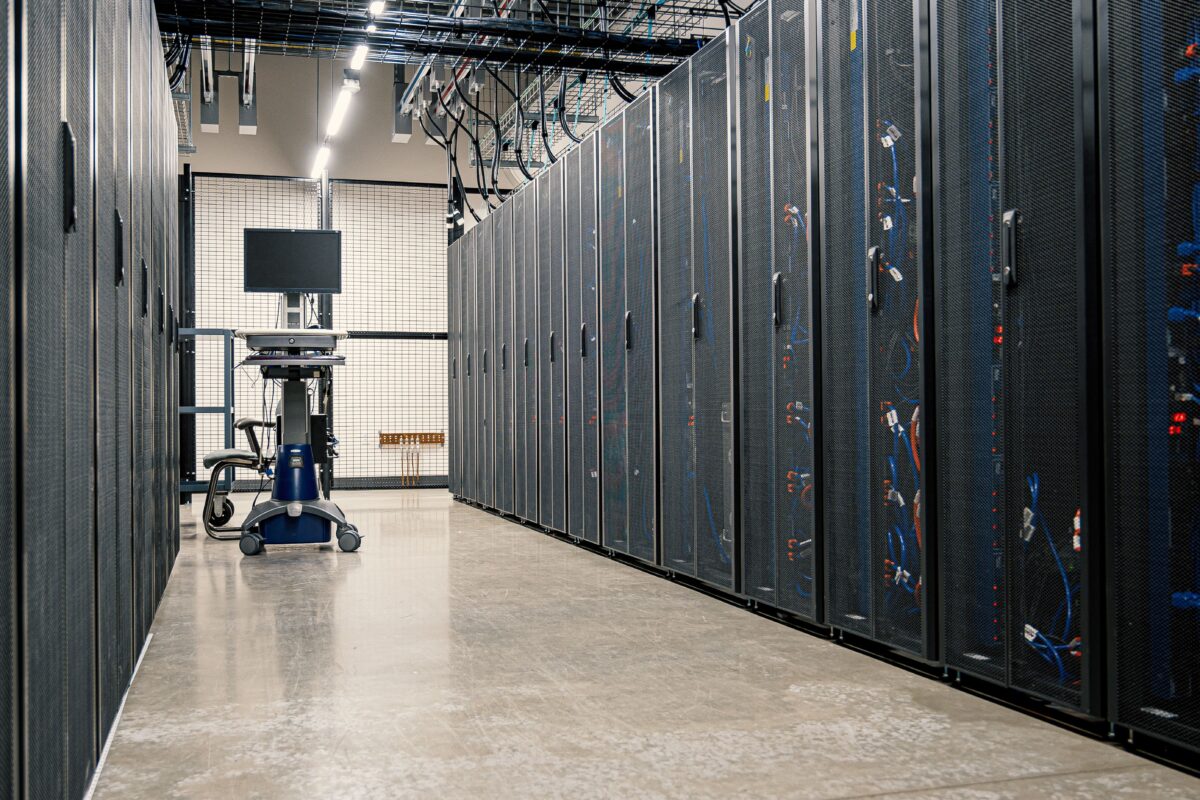
Cloud computing is one of the most important changes in modern computing infrastructure.
Instead of buying physical servers, installing them in a company-owned server room, configuring storage and networking, and maintaining the hardware yourself, an organization can rent computing resources from a cloud provider and provision them through software.
A developer can create a server in minutes.
A database can be provisioned without purchasing storage hardware.
An application can automatically scale when traffic increases.
And when those resources are no longer required, they can be reduced or removed.
That is the basic idea behind cloud computing.
The National Institute of Standards and Technology’s definition of cloud computing describes it as on-demand network access to a shared pool of configurable computing resources such as servers, storage, networks, applications and services that can be rapidly provisioned and released.
But cloud computing is more than simply “someone else’s server.”
It changes how computing infrastructure is purchased, deployed, managed and scaled.
What Is Cloud Computing?

At a basic level, cloud computing means accessing computing resources over a network instead of owning and operating all of the underlying physical infrastructure yourself.
Those resources can include:
- Virtual machines
- CPUs
- GPUs
- Memory
- Storage
- Databases
- Networking
- Containers
- Application platforms
- Security services
- Monitoring systems
- AI and machine-learning services
A traditional infrastructure setup might look like this:
Company
   |
   +--- Physical Servers
   |
   +--- Storage
   |
   +--- Network Equipment
   |
   +--- Firewall
   |
   +--- Power + Cooling
   |
   +--- IT Operations
A cloud-based setup can look very different:
Developer
    |
    ↓
Cloud Console / API
    |
    ↓
Cloud Provider
    |
    +--- Compute
    +--- Storage
    +--- Database
    +--- Networking
    +--- Security
    +--- Monitoring
The physical servers still exist.
They are simply operated by the cloud provider rather than being dedicated physical machines sitting in the customer’s office.
Cloud Computing Does Not Mean the Hardware Disappears
This is one of the most common misunderstandings about the cloud.
There is no magical computing environment floating somewhere on the internet.
Cloud providers operate enormous physical data centers containing:
- Servers
- CPUs
- GPUs
- Memory
- SSDs and other storage systems
- Network switches
- Fiber connections
- Power systems
- Cooling equipment
- Backup systems
- Physical security infrastructure
When you launch a virtual machine in the cloud, your workload eventually runs on physical computing hardware.
The difference is that the cloud provider manages the underlying infrastructure and exposes computing resources through software interfaces.
A simplified architecture looks like this:
                 Internet
                    |
                    ↓
             Cloud Provider
                    |
        +-----------+-----------+
        |                       |
     Network                 Storage
        |                       |
        +-----------+-----------+
                    |
              Physical Servers
                    |
              Virtualization
                    |
        +-----------+-----------+
        |           |           |
       VM 1        VM 2        VM 3
        |           |           |
      App A       App B       App C
Virtualization is one of the technologies that helped make this model practical at large scale. NIST identifies virtualization, along with networking and commodity server hardware, as important enabling technologies for cloud computing.
How Does Cloud Computing Work?

Cloud computing combines several layers of infrastructure and software.
At the bottom is the physical infrastructure.
Above that are virtualization, networking and storage systems.
On top of those layers are services that developers and organizations consume.
A simplified cloud stack looks like this:
Applications
     ↓
Cloud Services
     ↓
Containers / Virtual Machines
     ↓
Virtualization Layer
     ↓
Compute + Storage + Networking
     ↓
Physical Data Center
A customer usually interacts with the upper layers.
For example, a developer might use an API to create a virtual server:
Create server
     ↓
Select CPU/RAM
     ↓
Select operating system
     ↓
Select storage
     ↓
Select network
     ↓
Cloud platform provisions resources
The provider handles the physical infrastructure underneath.
This abstraction is one of the most important characteristics of cloud computing.
Virtualization Is a Major Part of the Cloud
Suppose a physical server has:
32 CPU cores
128 GB RAM
2 TB SSD
Running one application directly on that machine could leave a large amount of capacity unused.
Virtualization allows the physical machine to be divided into multiple logical environments.
For example:
Physical Server
--------------------------------
32 CPU cores
128 GB RAM
2 TB Storage
--------------------------------
       |
       ↓
Virtualization
       |
 +-----+------+------+
 |            |      |
 VM 1        VM 2   VM 3
 |            |      |
8 CPU        8 CPU  16 CPU
32 GB        32 GB  64 GB
Each virtual machine can run its own operating system and applications.
The cloud provider can therefore manage large pools of physical hardware and allocate resources dynamically.
Modern cloud infrastructure is much more sophisticated than simple virtual machines, however. Containers, orchestration systems, serverless platforms, managed databases and specialized accelerators all operate at different levels of abstraction.
The Three Main Cloud Service Models
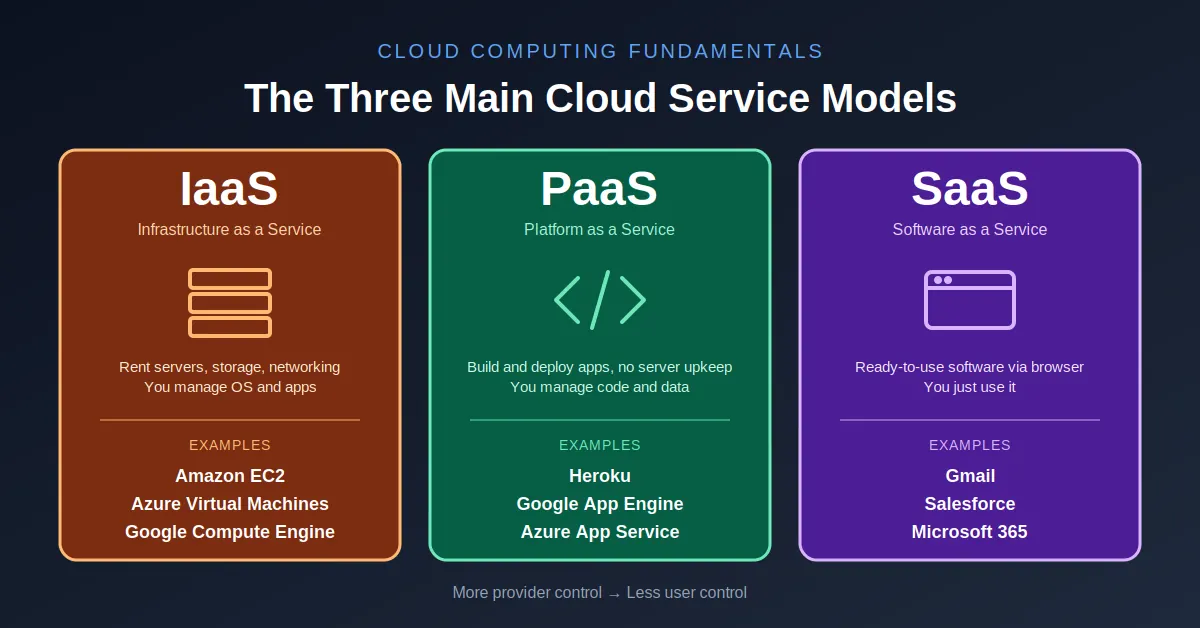
The standard cloud model commonly uses three major service categories:
- Infrastructure as a Service (IaaS)
- Platform as a Service (PaaS)
- Software as a Service (SaaS)
NIST’s cloud definition formally identifies these three service models.
The easiest way to understand them is to look at how much infrastructure the customer has to manage.
Infrastructure as a Service — IaaS
IaaS provides fundamental computing resources such as:
- Virtual machines
- Storage
- Networking
- Operating-system environments
The customer has substantial control over the software environment.
For example:
Cloud Provider
-------------------------
Physical hardware
Networking
Storage infrastructure
Virtualization
-------------------------

Customer
-------------------------
Operating system
Runtime
Application
Data
Configuration
A developer might provision a Linux virtual machine, install Nginx, configure a runtime and deploy an application.
IaaS therefore provides flexibility, but it also requires more operational responsibility.
NIST’s formal IaaS definition describes the model as providing processing, storage, networks and other fundamental computing resources on which customers can deploy and run software.
Platform as a Service — PaaS
PaaS moves another layer of infrastructure management to the provider.
Instead of managing the operating system and much of the underlying infrastructure, developers primarily focus on the application.
Conceptually:
Developer
    |
Application Code
    |
PaaS Platform
    |
Runtime
    |
Operating System
    |
Infrastructure
This can significantly reduce operational work.
The developer might simply provide application code while the platform handles much of the environment required to run it.
PaaS is particularly useful when development speed matters more than controlling every layer of the infrastructure.
Software as a Service — SaaS
SaaS is the most complete abstraction for the customer.
Instead of managing servers or application infrastructure, the user simply consumes the software.
Examples include web-based:
- Collaboration software
- Customer relationship management
- Accounting applications
- Project-management tools
The architecture can be simplified to:
User
 ↓
Web Browser / App
 ↓
SaaS Application
 ↓
Cloud Infrastructure
The user does not normally manage the underlying servers, operating system or storage.
NIST describes SaaS as using provider-managed applications running on cloud infrastructure and accessed through client devices or program interfaces.
IaaS vs PaaS vs SaaS
The difference becomes easier to understand through responsibility.
| Layer | IaaS | PaaS | SaaS |
|---|---|---|---|
| Physical hardware | Provider | Provider | Provider |
| Networking infrastructure | Provider | Provider | Provider |
| Virtualization | Provider | Provider | Provider |
| Operating system | Customer | Usually provider | Provider |
| Runtime | Customer | Provider/platform | Provider |
| Application | Customer | Customer | Provider |
| Data | Customer | Customer | Customer/user-managed |
| Infrastructure control | High | Medium | Low |
The exact division of responsibility varies between services, but the general principle remains:
The more managed the service, the less infrastructure the customer needs to operate directly.
Public Cloud, Private Cloud and Hybrid Cloud
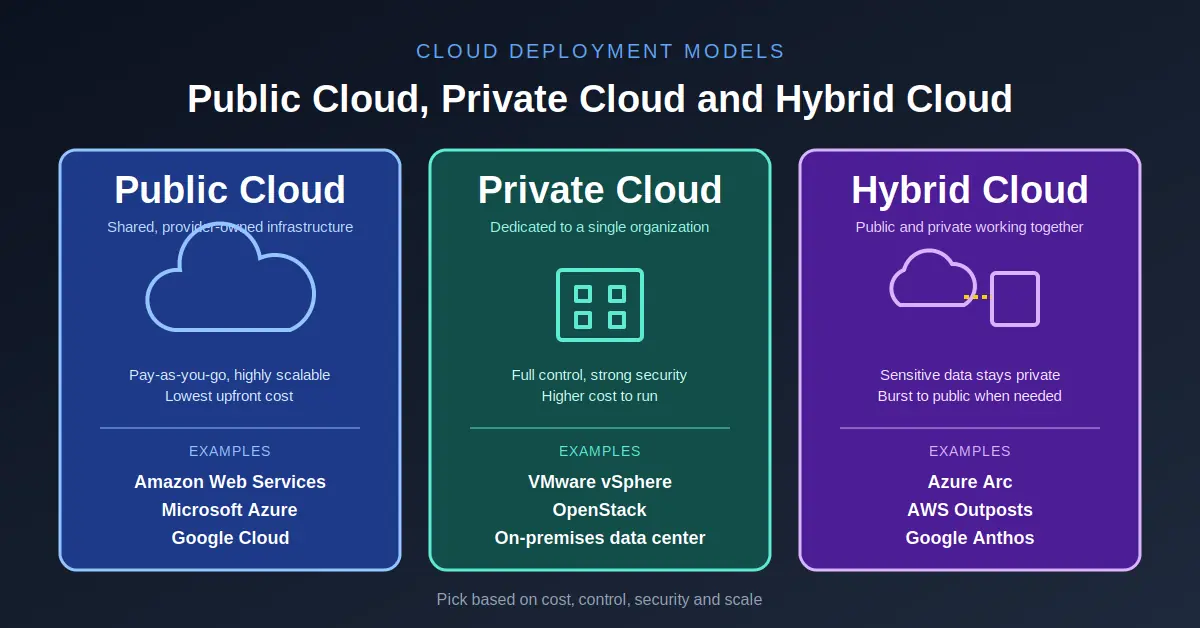
Cloud computing is also categorized by deployment model.
Public Cloud
A public cloud is operated by a cloud provider and made available to customers through shared infrastructure.
Major providers include:
- AWS
- Microsoft Azure
- Google Cloud
Customers use isolated resources and services without owning the physical data center infrastructure.
Private Cloud
A private cloud is dedicated to a particular organization.
The infrastructure can be operated by the organization itself or by another provider.
It may also exist on-premises or in an external facility.
Private cloud environments can be useful when an organization needs greater control over infrastructure, data handling or operational configuration.
Hybrid Cloud
Hybrid cloud combines different environments.
For example:
             Company
                |
       +--------+--------+
       |                 |
   Private Cloud      Public Cloud
       |                 |
 Internal systems     Web application
       |                 |
       +--------+--------+
                |
             Integration
An organization might keep sensitive workloads in a private environment while using public cloud resources for scalable application workloads.
NIST’s cloud framework includes public, private, community and hybrid deployment models.
What Are Cloud Regions?
Cloud infrastructure is distributed geographically.
A cloud provider does not normally operate one enormous facility for the entire world.
Instead, infrastructure is organized into geographical regions and separate availability locations.
For example:
                 Cloud Provider
                       |
       +---------------+---------------+
       |               |               |
    Region A        Region B        Region C
       |               |               |
     AZ 1            AZ 1            AZ 1
     AZ 2            AZ 2            AZ 2
     AZ 3            AZ 3            AZ 3
A region generally represents a geographic area where a provider operates cloud infrastructure.
An Availability Zone is an isolated infrastructure location within a region.
AWS, for example, describes Availability Zones as independent locations within a region, connected through low-latency, high-bandwidth networking.
This architecture allows developers to design applications that continue operating even if one infrastructure location experiences a failure.
Why Availability Zones Matter
Imagine a web application running entirely inside one infrastructure location.
If that location experiences a major failure, the application could become unavailable.
A more resilient architecture might distribute the application:
              Load Balancer
                    |
          +---------+---------+
          |                   |
       AZ 1                 AZ 2
          |                   |
      App Server          App Server
          |                   |
          +---------+---------+
                    |
                 Database
Traffic can be distributed between multiple locations.
If one location fails, another may continue serving requests, depending on how the application and database architecture are designed.
This is one reason cloud architecture is not simply about renting a server.
It is also about designing systems for availability, scaling and failure.
How Cloud Storage Works
Cloud computing also separates storage from individual physical machines.
Instead of attaching a single SSD to one server and treating it as the only copy of the data, cloud storage services can distribute data across infrastructure.
Common storage categories include:
Object Storage
Object storage is commonly used for:
- Images
- Videos
- Backups
- Documents
- Logs
- Datasets
- Static website assets
The application stores objects rather than interacting directly with a traditional disk filesystem.
Block Storage
Block storage behaves more like a disk attached to a server.
It is commonly used for:
- Operating systems
- Databases
- Application files
- Virtual machine storage
File Storage
File storage provides shared filesystem-style access to files and directories.
Different workloads require different storage models.
Choosing storage therefore depends on factors such as access patterns, latency, durability, throughput and cost.
Cloud Networking Is More Than an Internet Connection
Another common misconception is that cloud computing simply means putting a server online.
Cloud platforms provide sophisticated networking systems.
A typical application might use:
Internet
   |
DNS
   |
Load Balancer
   |
Web Servers
   |
Application Servers
   |
Database
Additional components can include:
- Private networks
- Subnets
- Firewalls
- Routing tables
- NAT gateways
- VPN connections
- Private endpoints
- Content delivery networks
- DDoS protection
- Traffic management
This allows organizations to create complex network architectures without physically purchasing and connecting every networking device themselves.
How Cloud Scaling Works
One of the biggest advantages of cloud infrastructure is the ability to provision resources dynamically.
Suppose a website normally receives:
1,000 requests/minute
During a major event, traffic suddenly becomes:
20,000 requests/minute
A fixed physical server might become overloaded.
Cloud infrastructure can be designed to respond by adding capacity.
Normal Traffic

Load Balancer
     |
 +---+---+
 |       |
App 1   App 2


High Traffic

Load Balancer
     |
 +---+---+---+---+---+
 |   |   |   |   |   |
 A1  A2  A3  A4  A5  A6
This is called horizontal scaling.
Instead of making one server extremely powerful, the system adds more instances.
Another approach is vertical scaling, where additional CPU, memory or other resources are assigned to an existing machine.
Cloud platforms make both approaches easier to automate.
Elasticity vs Scalability
These two terms are often used interchangeably, but there is a useful distinction.
Scalability means a system can handle increasing workload by adding resources.
Elasticity emphasizes automatically adjusting resources as demand changes.
For example:
Traffic
  ↑
  |          /\
  |         /  \
  |    /\  /    \
  |___/  \/      \____
       Time →
An elastic system might increase infrastructure during the traffic peaks and reduce it when demand falls.
This is particularly useful for workloads with unpredictable demand.
How Cloud Pricing Works
Cloud computing changed the economics of infrastructure.
With traditional infrastructure, an organization may need to purchase hardware before it knows exactly how much capacity it will need.
That can lead to overprovisioning.
For example:
Expected peak:
100 servers

Normal usage:
20 servers
The organization may still own enough hardware to handle the peak.
Cloud infrastructure can allow a company to provision closer to actual demand.
The general model becomes:
Demand increases
      ↓
Provision resources
      ↓
Use resources
      ↓
Demand decreases
      ↓
Release resources
However, cloud does not automatically mean cheaper.
A poorly designed cloud architecture can waste significant money through:
- Idle virtual machines
- Excessive storage
- Unused databases
- Overprovisioned resources
- High network-transfer costs
- Uncontrolled logging
- Unnecessary managed services
Cloud economics therefore require active cost management.
Why Companies Use Cloud Computing
Cloud computing can provide several operational advantages.
Faster Provisioning
A physical server can require purchasing, delivery, installation and configuration.
A cloud resource can often be provisioned through an API or management console.
Flexible Capacity
Organizations can increase or reduce resources according to workload.
Global Infrastructure
Cloud providers operate infrastructure across multiple geographical regions.
This allows applications to be deployed closer to users or distributed across locations.
Managed Services
Instead of operating everything yourself, you can use managed databases, storage, queues, monitoring, authentication and other services.
Automation
Infrastructure can be created and managed programmatically.
For example:
Code
 ↓
Infrastructure API
 ↓
Compute
 ↓
Network
 ↓
Database
 ↓
Application
This approach is often called Infrastructure as Code (IaC) when infrastructure configuration is maintained through code or declarative configuration.
Cloud Computing and Containers
Modern cloud infrastructure is not limited to virtual machines.
Containers provide another layer of abstraction.
A simplified comparison looks like:
Virtual Machine

Hardware
   ↓
Hypervisor
   ↓
Virtual Machine
   ↓
Operating System
   ↓
Application
A container architecture can look more like:
Hardware
   ↓
Operating System
   ↓
Container Runtime
   ↓
Container
   ↓
Application
Containers can be lightweight and portable, making them useful for modern application deployment.
Large cloud platforms also provide container orchestration services that automate deployment, scaling and management of containerized workloads.
Serverless Computing
Cloud computing has gone even further with serverless services.
The name can be misleading.
There are still physical servers.
“Serverless” generally means that the customer does not directly manage the underlying servers.
A developer may deploy a function:
Request
   ↓
Function
   ↓
Response
The platform handles much of the infrastructure required to execute it.
This can be useful for event-driven workloads where applications need to execute code in response to requests, messages or other events.
The trade-off is reduced infrastructure control and the need to design around the platform’s execution model and limits.
Cloud Computing and Databases
Cloud providers also offer managed database services.
Instead of installing a database server manually:
Install OS
   ↓
Install Database
   ↓
Configure Storage
   ↓
Configure Backups
   ↓
Configure Replication
   ↓
Monitor Database
a managed database service can automate or simplify much of that operational work.
The customer still needs to understand:
- Data modeling
- Queries
- Indexing
- Performance
- Backups
- Security
- Availability
- Costs
Cloud services do not eliminate engineering responsibility.
They move responsibility between the provider and customer.
The Shared Responsibility Model
This is particularly important for security.
Using cloud infrastructure does not mean the cloud provider is responsible for everything.
There is usually a division of responsibility.
A simplified example:
Cloud Provider
--------------------------
Physical data center
Physical servers
Physical networking
Underlying infrastructure
--------------------------

Customer
--------------------------
Application
User access
Credentials
Data
Configuration
Operating system*
--------------------------
The exact boundary depends on the service.
With IaaS, customers generally manage more.
With SaaS, the provider manages much more.
This is why understanding the service model is important when evaluating cloud security.
Is Cloud Computing Secure?
Cloud infrastructure can provide sophisticated security capabilities, but moving to the cloud does not automatically make an application secure.
Security depends on architecture and configuration.
Potential security controls include:
- Identity and access management
- Encryption
- Network isolation
- Firewalls
- Logging
- Monitoring
- Key management
- Backup systems
- Vulnerability management
- Multi-factor authentication
A badly configured cloud environment can still expose sensitive data.
For example:
Secure Infrastructure
        ≠
Secure Application
Both need to be designed correctly.
Cloud Computing vs Traditional Data Centers
The fundamental difference is who operates the infrastructure and how resources are consumed.
| Traditional Infrastructure | Cloud Computing |
|---|---|
| Buy physical servers | Provision resources |
| Own infrastructure | Rent/use provider infrastructure |
| Capacity planned in advance | Capacity can be adjusted |
| Hardware managed internally | Provider manages underlying infrastructure |
| Physical deployment | Software/API-based provisioning |
| Large upfront investment | Consumption-based models are common |
| Scaling can take time | Scaling can often be automated |
| Infrastructure location is fixed | Multiple regions/locations available |
This does not mean traditional infrastructure has become irrelevant.
Many organizations still operate their own infrastructure for reasons involving control, compliance, performance, cost or specialized workloads.
That is why hybrid architectures remain common.
What Actually Happens When You Deploy a Website to the Cloud?
Consider a simple web application.
A developer might create:
                         Internet
                            |
                           DNS
                            |
                     Load Balancer
                            |
                 +----------+----------+
                 |                     |
             Web Server             Web Server
                 |                     |
                 +----------+----------+
                            |
                     Application
                            |
                      Database
                            |
                         Storage
The infrastructure could include:
- Virtual machines or containers for the application
- A load balancer for incoming traffic
- A managed database
- Object storage for images and files
- A private network
- Firewall rules
- Monitoring and logging
- Backup infrastructure
The developer interacts with these resources through cloud APIs, dashboards or infrastructure-as-code tools.
The physical machines, power systems and data-center facilities remain behind the abstraction.
This is the real strength of cloud computing:
Infrastructure becomes programmable.
Why Cloud Computing Became So Important
The biggest change brought by cloud computing is not simply that servers became available through a web interface.
It is that infrastructure became much more flexible.
A developer can create resources programmatically.
A company can expand into another geographical region without constructing its own data center.
A startup can launch an application without purchasing a large amount of hardware.
An enterprise can combine managed databases, storage, networking, analytics and AI services into one architecture.
And modern AI workloads can consume specialized GPU infrastructure without requiring every organization to build its own GPU cluster.
This last point is becoming particularly important as AI workloads grow.
Cloud providers are now offering large pools of GPUs, high-speed networking and specialized infrastructure designed for machine-learning training and inference.
That leads directly into the next major question:
How are AI data centers different from traditional cloud data centers?
The Future of Cloud Computing
Cloud computing has evolved from simple virtual machines into a much broader infrastructure platform.
Today, the cloud can provide:
Compute
Storage
Networking
Databases
Containers
Serverless
Analytics
Security
AI/ML
GPU Infrastructure
Developer Platforms
The physical infrastructure is still there.
What changed is the abstraction layer between the customer and that infrastructure.
Instead of thinking primarily about:
Which physical server should I buy?
developers can increasingly think about:
What resources does my application need, and how should those resources be provisioned, connected, secured and scaled?
That shift is what made cloud computing so important.
Cloud computing is therefore best understood not as “servers on the internet,” but as a programmable model for consuming computing infrastructure and services on demand.
And as workloads become more demanding—especially AI workloads—the underlying cloud infrastructure is changing too.
The next step is understanding the physical systems behind that infrastructure.
How Data Centers Work is where we move from the cloud abstraction back down to the servers, racks, networking, power and cooling systems that make cloud computing possible.
SiliconeUpdate.com is a technology news platform that publishes updates and informational content related to silicon technology, software, artificial intelligence, and emerging technologies.
All articles published on this platform are attributed to SiliconeUpdate.com instead of individual authors. Content is presented in a neutral, informational format without personal opinions.
—
Content Publishing
SiliconeUpdate.com publishes news and updates based on publicly available information, official announcements, and industry developments. The focus is on clarity, relevance, and timely reporting.
—
Editorial Control
All editorial decisions, updates, and content management are handled at the platform level. No individual human or AI identity is presented as the author of articles.
—
Contact
For editorial communication or general queries, contact:
Email: neemasharma@gmail.com