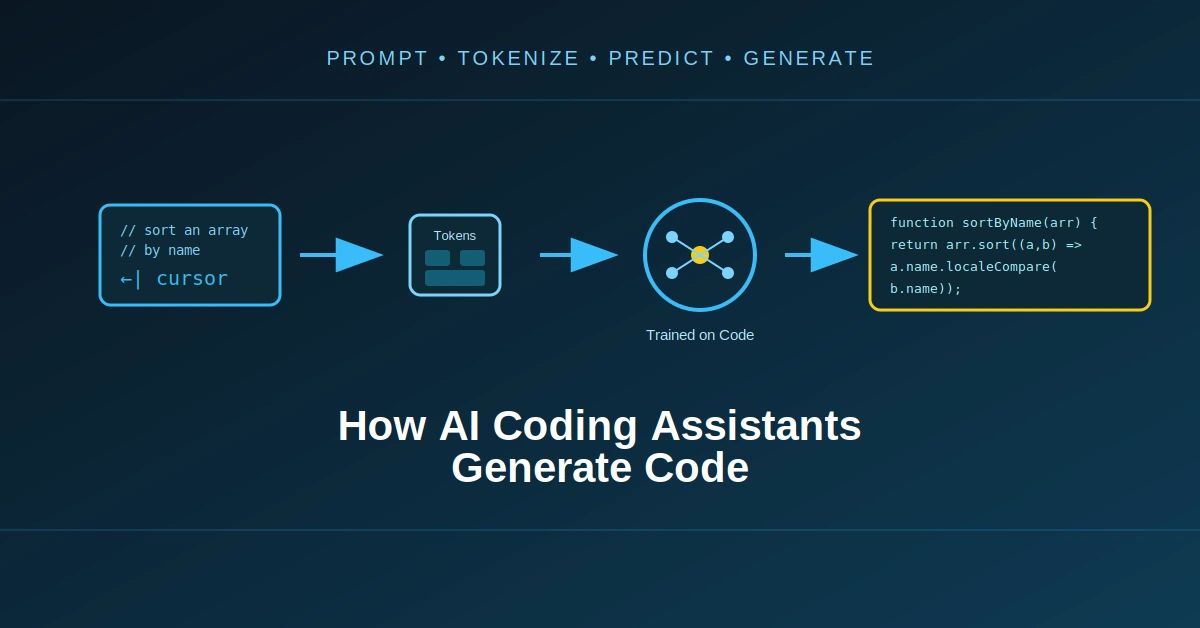
AI coding assistants can now generate functions, write complete components, explain unfamiliar code, find bugs, create tests, and even modify multiple files in a project.
From the outside, the experience can look almost magical.
You type:
Create a React login form with email validation and
a password visibility toggle.
A few seconds later, the assistant produces code.
But what actually happens between the prompt and the generated code?
The answer is more interesting than simply saying that “AI writes code.”
Modern coding assistants combine large language models, token prediction, code context, retrieval, project information, and increasingly, tools that allow the model to inspect and modify a development environment.
Understanding this process also explains why an AI coding assistant can sometimes generate an excellent implementation and, a few moments later, produce code that looks reasonable but is completely wrong.

What Is an AI Coding Assistant?
An AI coding assistant is a software system that uses an AI model to help with programming tasks.
Depending on the product and configuration, it can perform tasks such as:
- generating new code
- completing partially written code
- explaining code
- fixing errors
- generating tests
- refactoring code
- converting code between languages
- creating documentation
- searching a codebase
- modifying existing files
- working with development tools
The language model is the central component, but the assistant around it is often much more than a model.
A useful simplified architecture looks like this:
Developer
    |
    v
Coding Assistant
    |
    +---- User Prompt
    |
    +---- Current File
    |
    +---- Project Context
    |
    +---- Previous Conversation
    |
    +---- Tools / Retrieval
    |
    v
AI Model
    |
    v
Generated Code
    |
    v
Editor / Tool / Application
The model doesn’t necessarily receive only the sentence you typed.
The surrounding system may construct a much larger context before sending the request.
That context can make a huge difference in the quality of the generated code.
The AI Does Not See Your Entire Computer
This is one of the first things to understand.
When you ask a coding assistant:
“Fix this function.”
The model doesn’t automatically have access to everything on your computer.
The coding application decides what information should be provided to the model.
For example, it might send:
Current file
+
Relevant surrounding code
+
Selected code
+
Error message
+
Related files
+
Developer instructions
+
Conversation history
The exact architecture differs between products.
Some assistants can search the repository and retrieve relevant files.
Others can use tools to inspect directories, execute commands, run tests, or modify files.
So the model’s ability to understand a project depends partly on how much useful context the surrounding coding system can provide.
Code Is Converted Into Tokens
Before a language model can process code, the text has to be represented in a form the model can process.
Language models operate on tokens.
A token isn’t necessarily the same thing as a word.
For example:
const calculateTotal = (price, tax) => {
    return price + tax;
};
is broken into smaller token units according to the model’s tokenizer.
The model processes those tokens and predicts what should come next.
This is one reason programming languages work surprisingly well with language models.
Code has a lot of structure.
It contains patterns such as:
function
variable
=
condition
{
}
return
and relationships between identifiers, operators, types, APIs, and syntax.
During training, models are exposed to enormous amounts of text and code, allowing them to learn statistical relationships between these patterns.
How Does the Model Know How to Write JavaScript?
Suppose you write:
function add(a, b) {
The model has to predict what comes next.
A simplified view is:
function add(a, b) {
              ↓
        next token prediction
              ↓
            return
Then:
return
   ↓
a
   ↓
+
   ↓
b
   ↓
;
The model generates the output incrementally.
But modern models are doing much more than memorizing isolated lines.
During training, they learn relationships between programming concepts, syntax, APIs, common implementation patterns, and natural-language instructions.
That allows a prompt such as:
Create a function that filters users
whose age is greater than 18.
to produce something like:
function getAdults(users) {
    return users.filter(user => user.age > 18);
}
The model is generating tokens based on the context available to it.
The Model Is Not Running Your Code While Generating It
This distinction is important.
When a model generates:
const total = price * quantity;
it isn’t necessarily executing that JavaScript and checking whether the result is correct.
The initial generation is fundamentally a prediction process.
That means the model can produce:
const result = users.filter(user => user.age > 18);
even when:
users
doesn’t actually exist in the application.
The code can look perfectly reasonable while still being incompatible with the project.
This is one reason generated code must be validated.
Context Is One of the Most Important Parts
Consider these two prompts.
Prompt A
Create a login function.
Prompt B
This project uses Next.js 15,
TypeScript, Prisma and PostgreSQL.

The User model contains:
id, email, passwordHash.

Authentication is handled using our existing
session utility in lib/auth.ts.

Create the login server action using the
existing authentication flow.
Prompt B gives the model much more information.
The result can therefore be substantially different.
This is why coding assistants spend a lot of effort determining what context should be sent to the model.
The model itself may be capable of generating code, but the surrounding system determines whether it has enough information to generate code that actually fits the project.
What Is Code Context?
Code context is the information surrounding the task.
It can include:
Current file
Selected code
Imports
Function definitions
Types
Related files
Configuration
Error messages
Documentation
Previous requests
Project structure
For example, if you ask:
Fix this API call.
the assistant might need to know:
api/client.ts
components/UserList.tsx
types/user.ts
.env configuration
API response format
Without that context, it may invent an API structure.
With the relevant context, it can potentially adapt the solution to the actual project.
How Does an AI Assistant Find Relevant Files?
This is where modern coding assistants become more interesting.
A large project can contain:
src/
  components/
  pages/
  hooks/
  services/
  utils/
  database/
  types/
Sending every file to the model for every request would be inefficient and may exceed the model’s available context.
So a coding assistant may use some form of retrieval.
The basic idea is:
Developer Question
       |
       v
Find Relevant Code
       |
       v
Select Context
       |
       v
AI Model
For example:
"Fix the user profile API"
could lead the system to identify files such as:
api/user.ts
services/userService.ts
types/User.ts
components/Profile.tsx
The exact retrieval method varies between systems.
It may involve search, embeddings, symbol information, repository indexing, file relationships, or other techniques.
Why Code Retrieval Is Difficult
Finding a relevant file isn’t always enough.
Suppose the project contains:
UserService.ts
UserController.ts
UserRepository.ts
UserModel.ts
The assistant needs to understand how these pieces relate to each other.
A bug in:
UserController.ts
could actually be caused by:
UserRepository.ts
or a type definition elsewhere.
This creates a context-selection problem.
Too little context:
Model doesn't understand the project.
Too much context:
Important information gets buried,
processing becomes expensive,
and the available context can become crowded.
The goal is therefore not simply:
“Send everything.”
The goal is:
“Send the most useful information.”
The Model Uses Attention to Connect the Context
Modern transformer-based language models use attention mechanisms to process relationships between tokens.
For code generation, this can help the model relate things such as:
const user = getUser();
to later code:
user.email
The model processes the surrounding context and estimates relationships between different parts of the sequence.
This is one reason a model can often understand that:
function getUser(id) {
is related to:
const user = getUser(userId);
even when those pieces appear at different locations in the provided context.
The exact internal computation is extremely complex, but the important practical point is that context allows the model to condition its generation on the code surrounding the task.
Code Completion Works Differently From Chat
Not every coding-assistant request is a normal chat conversation.
Consider autocomplete.
You write:
const users = await db.
The assistant may immediately suggest:
findMany();
This type of interaction is optimized for low latency.
The system may use a smaller or specialized model, limited context, and aggressive caching or prediction techniques.
The objective is different from a large coding task.
Autocomplete needs:
Fast response
+
Small useful suggestion
while a coding agent may need:
Repository understanding
+
Planning
+
Multiple files
+
Tool calls
+
Testing
These are very different workloads even though both may appear as “AI coding.”
Chat-Based Code Generation
Now consider:
Build a React dashboard with authentication,
a sidebar, user settings, and a responsive layout.
This is much larger.
The assistant may first interpret the request and generate a plan.
For example:
1. Create dashboard layout
2. Create sidebar
3. Add authentication state
4. Create settings page
5. Add responsive styles
6. Connect user data
Then it may generate code for multiple files.
A more advanced system may actually perform these steps using tools.
Modern Coding Agents Go Beyond Code Generation
This is an important evolution.
Early AI coding tools were largely autocomplete systems.
Modern coding agents can operate more like software-development assistants.
A simplified agent loop looks like:
User Request
     |
     v
Understand Task
     |
     v
Plan
     |
     v
Inspect Codebase
     |
     v
Generate / Modify Code
     |
     v
Run Tests
     |
     v
Inspect Errors
     |
     v
Modify Code
     |
     v
Run Tests Again
     |
     v
Final Result
This is fundamentally different from simply predicting the next line.
The model becomes part of a larger agentic software workflow.
Tools Give the Model More Capabilities
A coding agent may have access to tools such as:
File search
File read
File editing
Terminal
Compiler
Test runner
Package manager
Git
Documentation search
Browser
For example, the model might decide:
I need to inspect package.json.
The system executes the file-read operation and returns the result.
Then the model may decide:
I need to inspect src/auth.ts.
The tool retrieves it.
Then:
I need to modify src/login.ts.
The system performs the edit.
The important distinction is:
The model proposes actions; the surrounding software executes those actions.
This separation is a major part of modern AI coding agents.
What Happens When the Model Makes a Mistake?
Suppose the assistant generates:
import { authenticate } from "./auth";
but the project actually uses:
import { authenticateUser } from "./authentication";
The generated code may fail.
A traditional code generator might simply return the incorrect code.
An agent with tools can potentially discover the problem.
For example:
Generate code
     |
     v
Run compiler
     |
     v
Module not found
     |
     v
Inspect project
     |
     v
Find correct module
     |
     v
Fix import
     |
     v
Run compiler again
This feedback loop is one of the most important improvements in AI-assisted development.
Why Running Tests Changes Everything
Generated code that looks correct isn’t necessarily correct.
Consider:
function divide(a, b) {
    return a / b;
}
It looks fine.
But what should happen when:
b = 0
The correct behavior depends on the application.
A test suite can expose assumptions that aren’t obvious from the code itself.
An AI coding agent can therefore use tests as feedback:
Generate
   ↓
Test
   ↓
Failure
   ↓
Analyze
   ↓
Modify
   ↓
Test again
This is much closer to how a human developer works.
Why AI Coding Assistants Sometimes Generate Bad Code

There are several reasons.
1. Missing context
The assistant doesn’t know an important project detail.
2. Ambiguous requirements
The developer didn’t specify what should happen in an edge case.
3. Incorrect assumptions
The model assumes a library, API, or function exists.
4. Outdated information
The model may have learned patterns that don’t match the current version of a library.
5. Hallucinated APIs
The assistant may generate a function that sounds realistic but doesn’t actually exist.
For example:
someLibrary.enableMagicMode();
The code looks plausible.
But the API may be completely fictional.
6. Logical errors
The syntax can be valid while the algorithm is wrong.
7. Integration problems
A function may work independently but not fit the rest of the application.
This is why “the code compiles” and “the code is correct” are two very different statements.
AI Coding Assistants Can Generate Code They Have Never Seen
This is an interesting consequence of language-model generation.
Suppose you ask for:
Create a function that converts an array of
objects into a lookup map indexed by ID.
The model can generate:
function createLookup(items) {
    return Object.fromEntries(
        items.map(item => [item.id, item])
    );
}
It doesn’t need to retrieve this exact function from a database.
It can combine learned programming patterns to generate a new implementation.
This is why code generation is better understood as conditional generation based on learned patterns and current context, rather than simple copy-and-paste from a training dataset.
Does AI Memorize Code From GitHub?
This question is more complicated than it first appears.
Large AI models are trained on large collections of text and code, but training does not mean the model stores every repository as a searchable database.
The model learns statistical patterns during training.
There can still be concerns about memorization, reproduction of training examples, licensing, and provenance, particularly when models generate code that resembles existing material.
That is one reason responsible use of AI-generated code includes reviewing licenses, dependencies, security implications, and the provenance requirements relevant to your project.
The practical lesson for developers is simple:
Don’t assume generated code is automatically free of licensing or security considerations just because an AI produced it.
What Is the Role of the Prompt?
The prompt is important, but it isn’t everything.
Compare:
Build a login page.
with:
Create a React + TypeScript login form.

Requirements:
- Email validation
- Password visibility toggle
- Use our existing Button component
- Use the existing auth API
- Show server errors
- Disable the submit button while loading
- Keep the current design system
The second request gives the assistant significantly more constraints.
Good prompts reduce ambiguity.
But good context can be even more important when the task involves an existing codebase.
AI Coding Is a Context Problem
This is one of the most important ideas to understand.
Suppose the model is extremely capable but receives:
Create a function to update the user.
It still has to guess:
- Which database?
- Which ORM?
- Which user fields?
- Which authentication system?
- Which validation library?
- Which error format?
- Which API convention?
- Which TypeScript types?
- Which file should contain the function?
The more relevant information the assistant can access, the fewer of these decisions it has to guess.
That is why modern coding assistants increasingly focus on context engineering, not just model intelligence.
Context Windows Matter
A model can only process a finite amount of context in a single request.
That context can include:
System instructions
+
User request
+
Conversation
+
Source code
+
Documentation
+
Tool results
If a project contains millions of tokens of source code, it obviously cannot all be placed into one request in the simplest possible way.
The coding system therefore needs strategies for selecting relevant information.
This is another reason repository indexing, search, retrieval, summarization, and tool use are becoming important components of coding assistants.
Why Bigger Context Doesn’t Automatically Solve Everything
It might seem that the obvious solution is:
“Just give the model the entire repository.”
But more context isn’t automatically better.
Imagine sending 500 files to the model for a task involving one function.
The relevant code could become difficult to identify.
There can also be higher processing costs and longer responses.
A useful coding assistant therefore needs to balance:
Enough context
        +
Relevant context
        +
Manageable context
The goal is not maximum context.
The goal is useful context.
From Code Completion to Software Engineering Agents
The evolution can be roughly visualized like this:
Autocomplete
     |
     v
Code Chat
     |
     v
Repository-Aware Assistant
     |
     v
Tool-Using Coding Agent
     |
     v
Agentic Software Development
The first generation primarily completed code.
The next generation could answer programming questions.
Repository-aware systems could understand more of an existing project.
Tool-using agents can inspect files, modify code, execute tests, and react to results.
This changes the role of AI in software development.
Instead of:
Human writes code
AI suggests lines
the workflow can become:
Human defines objective
        ↓
AI investigates
        ↓
AI proposes changes
        ↓
AI modifies code
        ↓
AI runs validation
        ↓
Human reviews result
The human developer remains responsible for deciding what should actually be built and whether the result is acceptable.
AI Coding Assistants Are Not Compilers
Another useful distinction:
A compiler follows deterministic rules defined by a programming language.
An AI model generates a probable continuation based on learned patterns and context.
For example:
Compiler:
"Is this syntactically valid?"

AI model:
"What code would be a plausible continuation here?"
A compiler can tell you that something is invalid according to language rules.
An AI model can generate code that is syntactically valid but logically incorrect.
This difference explains why AI-generated code still needs traditional development tools.
The Best Systems Combine AI With Traditional Tools
A strong coding workflow doesn’t have to choose between AI and conventional software engineering.
They complement each other.
AI
 ↓
Generate / Modify
 ↓
Compiler
 ↓
Tests
 ↓
Linter
 ↓
Static Analysis
 ↓
Security Checks
 ↓
Human Review
Each component answers a different question.
The AI can help produce and modify code.
The compiler checks language-level correctness.
Tests check expected behavior.
Linters identify common problems.
Security tools can identify vulnerabilities.
Human review checks whether the implementation actually makes sense for the product.
Why AI-Generated Code Can Look So Good and Still Be Wrong
This is probably the most important limitation to remember.
Programming code has a strong visual structure.
A function can look clean:
function calculateDiscount(price, percentage) {
    return price - (price * percentage / 100);
}
The code is readable.
The syntax is valid.
The function name makes sense.
But suppose the application stores the percentage as:
0.20
instead of:
20
The function would produce the wrong result.
The problem isn’t syntax.
It’s the mismatch between the generated code and the application’s actual assumptions.
AI coding therefore isn’t only about generating code that looks correct.
It’s about generating code that is correct within a specific system.
Where AI Coding Assistants Are Going
The direction of development is moving from simple code completion toward systems that can understand larger software tasks.
Instead of asking:
Write a function.
developers can increasingly ask:
Find why checkout is failing,
fix the issue, add a regression test,
and verify the relevant tests.
That requires several capabilities:
Understand request
       ↓
Inspect repository
       ↓
Find relevant code
       ↓
Reason about problem
       ↓
Modify files
       ↓
Run tests
       ↓
Analyze failures
       ↓
Iterate
The difficult part is no longer simply generating a function.
It is maintaining a reliable loop between reasoning, context, actions, and verification.
Final Thoughts
AI coding assistants work because modern language models are very good at processing and generating sequences of code and natural language.
But the model itself is only one part of the system.
A modern coding assistant can combine:
- language models
- tokenization
- code context
- repository search
- retrieval
- conversation history
- tool calling
- file editing
- compilers
- tests
- debugging loops
- human review
The basic generation process can still be summarized simply:
Context
   +
Developer Request
   ↓
AI Model
   ↓
Token Generation
   ↓
Code
But advanced coding agents extend that process:
Request
   ↓
Understand
   ↓
Retrieve Context
   ↓
Plan
   ↓
Generate
   ↓
Edit
   ↓
Run
   ↓
Test
   ↓
Observe
   ↓
Fix
   ↓
Verify
That second workflow is where AI-assisted programming becomes much more interesting.
The future of AI coding isn’t just about models that can write more lines of code.
It is about systems that can understand software projects, use the right context, interact with development tools, test their own changes, and work through an engineering task from beginning to end.
And that is a much bigger problem than code autocomplete.

SiliconeUpdate.com is a technology news platform that publishes updates and informational content related to silicon technology, software, artificial intelligence, and emerging technologies.
All articles published on this platform are attributed to SiliconeUpdate.com instead of individual authors. Content is presented in a neutral, informational format without personal opinions.
—
Content Publishing
SiliconeUpdate.com publishes news and updates based on publicly available information, official announcements, and industry developments. The focus is on clarity, relevance, and timely reporting.
—
Editorial Control
All editorial decisions, updates, and content management are handled at the platform level. No individual human or AI identity is presented as the author of articles.
—
Contact
For editorial communication or general queries, contact:
Email: neemasharma@gmail.com